
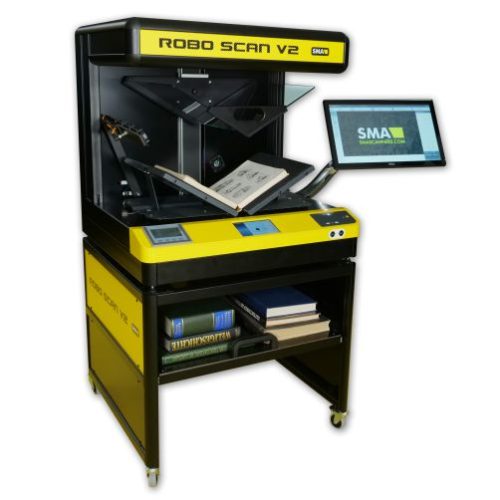
The ROBO SCAN V2 robotic book scanner is the most versatile scanning robot on the market. It offers the convenience of a robotic book scanner combined with the advantages of a manual book scanner. The ROBO SCAN V2 scanning robot was developed for realistic scenarios in which the majority of books are digitized robotically and problematic books are digitized manually.
For optimal results, we recommend using a V-shaped glass plate. The scanning process, including the glass plate procedure, is fully automatic.
Contactless scanning of special books is possible at any time. The V-shaped glass plate can be removed by any operator in less than a minute.
Problematic or delicate books can also be scanned manually. To do this, simply deactivate the robotic arm using the touch panel.
With the ROBO SCAN V2 robotic book scanner, you can also scan documents such as magazines or individual receipts in a 180-degree position. The V-shaped book cradle can be flattened with a single movement.
The ROBO SCAN V2 has an integrated PC and can therefore be used as a stand-alone solution. The scanner's individual IP address allows it to be connected directly to your network. Those who prefer to work in a workplace-oriented manner can do so as well. A separate PC with application software can be connected to the ROBO SCAN V2 via a network cable. This ensures a more comfortable working environment. The software solution offered for this purpose is the Batch Scan Wizard, a fast and easy-to-use application for professionally handling large scan volumes and scan jobs. The software speeds up document throughput and significantly reduces operational tasks. The Batch Scan Wizard is also ideal for small scan volumes with specific requirements, such as page division or the capture of specific image sections. The user creates scan jobs and individual scan profiles. All scanned documents are recorded in a scan job until the user completes the scan job. In addition to standard scan parameters such as brightness, contrast, color mode, and file format, the Batch Scan Wizard allows you to define and extract multiple sections of a document and then save them as a single image. Nothing is lost, because the user can call up and modify a saved scan job again and again. This is done using the functions Cut, Delete, Replace, and Insert for a selected image in the generated image stack. The respective file name and the name of the directory can be changed later.
You can find more robotic book scanners from SMA here: https://www.smascanners.com/produktgruppe/robotische-buchscanner/